If you ask ten people at an oilfield service company what their biggest operational challenge is, you’ll get ten different answers. The dispatcher will tell you it’s keeping track of where every crew and piece of equipment is at any given moment. The field manager will tell you it’s getting accurate tickets back from location without chasing them for two weeks. The accountant will tell you it’s the three-hour daily ritual of re-keying data from paper into the billing system. The owner will tell you it’s not knowing, in real time, whether the business is actually making money on each job.
These are not ten separate problems. They are the same problem – disconnected information – showing up in different departments. And oilfield operations management software is what solves it.
The Definition
Oilfield operations management software is a platform that connects every stage of an oilfield service company’s workflow – from the initial job request through dispatch, field execution, ticketing, approval, and invoicing – in a single system.
In the oilfield services context, it is a digital platform designed to streamline, automate, and optimize the execution and monitoring of field operations. It connects field technicians, back office personnel, and management through a centralized system that handles everything from job scheduling and dispatching to asset tracking, invoicing, and maintenance.
The key word there is “centralized.” The problem most OFS companies live with is not that they lack software – it’s that they have too many disconnected pieces: one spreadsheet for dispatch, another for equipment tracking, a third for billing, and a paper-based field ticket workflow that bridges none of them reliably.
What Does an Oil Field Manager Software Actually Do?
The specific features vary by platform, but any credible
oil field manager software handles these core functions:
- Job scheduling and dispatch. Jobs are created in the system, crews and equipment are assigned, and field technicians receive their assignments on a mobile device. No phone calls to relay job details. No manual scheduling boards.
- Field ticketing. Field technicians complete digital tickets at the job site – logging labor hours, equipment usage, and materials – and collect a customer signature electronically. The completed ticket is available to the office instantly, not after a two-week paper trail.
- Asset and equipment tracking. Every piece of equipment has a record showing its current status: on location, available in the yard, under maintenance, or rented out. Operations managers see the full picture in real time without making calls to the field.
- Maintenance management. The system tracks maintenance schedules by asset and generates alerts when service is due. Instead of manually tracking equipment maintenance schedules, the software automatically generates alerts when maintenance is due, allowing teams to stay ahead of potential issues before they cause downtime.
- Invoicing. Approved field tickets flow directly into the billing workflow. Rates are pre-configured, calculations are automatic, and invoices are generated in hours rather than days.
- Reporting and dashboards. Management gets a real-time view of job profitability, equipment utilization, crew productivity, and receivables – without waiting for accounting to manually compile a report at the end of the month.
Who Uses It Day to Day?
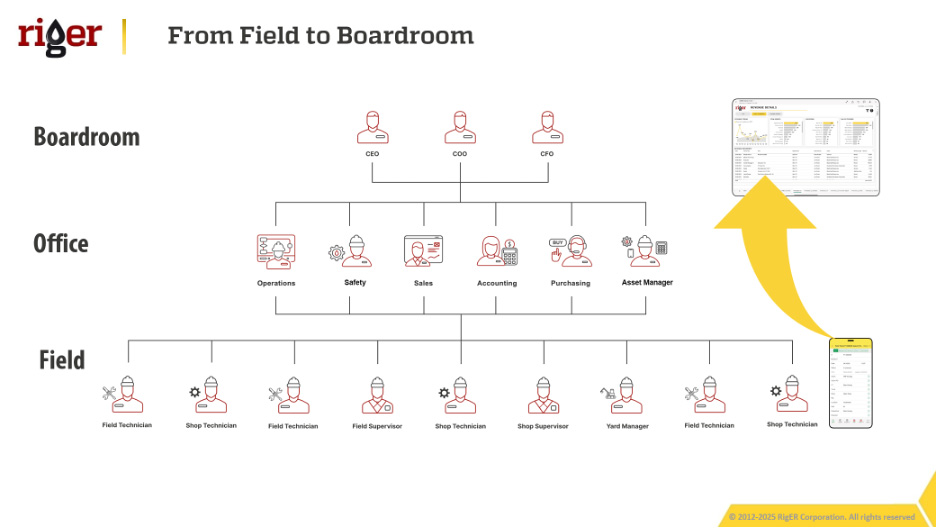
Operations management software is not a tool for one department. It is used across the entire company, and the value multiplies the more consistently it is adopted.
- Operations managers use it to oversee the full picture – what crews are deployed, what equipment is on location, what jobs are in progress, and what is coming up on the schedule. The platform replaces the mental juggling act that most operations managers currently perform by putting everything in one visible, searchable system.
- Dispatchers use it to assign jobs and equipment efficiently, avoid double-booking, and communicate assignment changes to field crews without phone tag.
- Field technicians use the mobile app to receive assignments, complete field tickets, log hours, attach photos, and collect client signatures – from anywhere, including remote locations with no cell service, where data syncs automatically once connectivity is restored.
- Accountants and billing staff use it to process tickets and generate invoices. When the data flows in from the field already structured and approved, billing becomes a review-and-send process rather than a data-entry marathon.
- Owners and executives use reporting and dashboards to track revenue, margin, and operational efficiency without asking three departments to compile spreadsheets.
![image]()