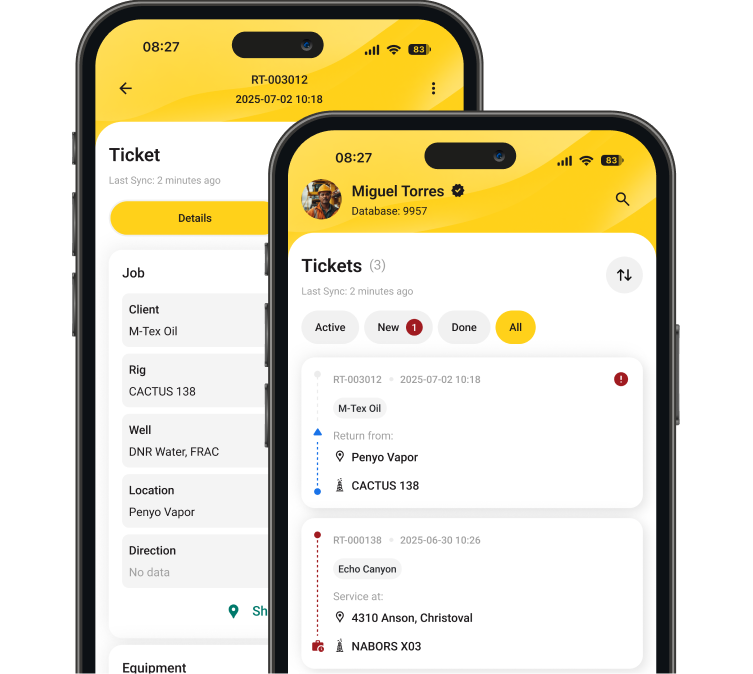
A field ticket written at a wellsite at 2 a.m. has to survive a truck cab, a shift change, a coffee spill and a drive to the district office before anyone in accounting sees it. Some don’t survive. The ones that do often show up smudged, missing a signature, or two weeks late. By then the customer’s memory of what happened on that job has faded too.
That’s the reason oilfield service and rental companies across Texas, Alberta and Oklahoma have been moving to electronic field tickets. The paper ticket is the slowest part of the cash cycle.
What are electronic field tickets?
An electronic field ticket is a digital record of the labor, equipment and materials used on a job, created on a phone or tablet at the wellsite instead of on a carbon-copy paper form. It is the same
LEM sheet your crews already fill out, captured on a device instead of on carbon paper. The technician enters the job details on the device, attaches photos, and captures the customer representative’s signature on site. The ticket syncs to the office system, where dispatch and accounting can see it the same day.
You’ll also hear them called digital field tickets, mobile field tickets or oilfield e-tickets. They’re the same thing: field data captured once, at the source, by the person who did the work.
What changes is the ticket itself. It stops being a physical object somebody has to drive to the office, and becomes a record the office can act on while the crew is still on location.
Where paper tickets cost oilfield companies money
Paper leaks money in four places: tickets that never make it back from location, invoices that go out weeks after the work is finished, disputes caused by handwriting nobody in the AP department can read, and errors introduced every time someone re-keys the same numbers. Our earlier post on what a field ticket is and why it matters covers each of those in detail.
The timing is the part most companies underestimate. A signed paper ticket sits with the crew until the end of a hitch. On a 14-day rotation, that’s two weeks before accounting even has the document in hand. Add a few days for data entry and review, and a job completed on the 1st gets invoiced near the end of the month. RigER’s own client data puts typical paper ticket processing at around three weeks from job to invoice.
The leakage is harder to see. A tool gets swapped at 3 a.m., an extra length of hose gets used, a crew waits four hours on location, and none of it appears on the ticket because the technician was focused on the job, not the paperwork. RigER’s data shows unbilled or miskeyed line items can cost operators 5–7% of revenue when nobody’s tracking them.
On $8 million of annual service revenue, that’s somewhere between $400,000 and $560,000 of work you performed and never charged for.
How an electronic field ticket moves through a job
Capture at the wellsite, with or without signal
Cell coverage is the first objection, and it’s a fair one. There’s no service on plenty of pads, and it’s why field ticket software built for oil and gas works offline rather than requiring a connection.
With the
RigER 24 mobile app, technicians create and update tickets with no signal at all. Labor hours, equipment used, materials consumed, inspection results and job photos are stored on the device. When the truck comes back into coverage (at the yard, at the highway, at a hotel) everything syncs automatically, without anyone remembering to upload it.
Customer approval on location
The company man signs on the device before the crew leaves. That signature is time-stamped and attached to the ticket, along with the photos of the work.
Most billing disputes start with a customer questioning hours or equipment they don’t remember agreeing to. Here they approved both while standing next to the equipment, not three weeks later from a paper copy they can barely read.
Sync, review, invoice
Once the ticket syncs, the office sees it. A supervisor reviews it, an approver signs off, and accounting turns it into an invoice from the same record, without re-keying anything. RigER clients using digital field tickets have moved ticket processing from three weeks to about 24 hours.
The job takes exactly as long as it did before. The difference is that the paperwork no longer holds up the invoice.
![image]()
What changes in the office
Dispatch
Dispatch gains visibility it didn’t have. Instead of calling a supervisor to ask whether the job at the north pad has wrapped, the dispatcher sees the ticket come in. Equipment shows as returned and available for the next job, which matters when you’re deciding whether to sub-rent for tomorrow’s schedule.
Accounting
Accounting stops being a data entry department. When electronic field tickets flow into invoicing directly, and from there into QuickBooks or Sage, the accountant’s job shifts to reviewing exceptions rather than typing every line item off a stack of paper. That’s the difference between an AR clerk who spends four days a month on entry and one who spends four hours.
Management
Management gets numbers that are current. This is where
oilfield operations management software earns its keep. Rental fleet utilization, field personnel utilization and job profit margin are only useful if the underlying tickets are recent. On paper, your margin report is always describing last month.
The three objections you’ll actually hear
“Our guys aren’t tech people.” Most field technicians already run a smartphone, a truck GPS and equipment with a digital control panel. A ticket app with the fields laid out the way your paper ticket was laid out is a smaller change than the pushback suggests. Show it to them in the truck at shift change rather than in a boardroom.
“There’s no signal at the wellsite.” Offline capture answers this, and it’s worth confirming with any vendor you evaluate that their app writes to the device and syncs later, rather than showing an error screen the moment coverage drops.
“We tried an app and it didn’t stick.” Usually the app was built for HVAC or general field service and didn’t have rental days, sub-rentals, standby time, third-party charges or crew rotation. Generic field service software doesn’t survive contact with oilfield billing. Oil and gas field ticket software is built around those concepts from the start.
How to move your operation off paper
- Pick one service line. Don’t convert the whole company at once. Choose a single crew type (wireline, flowback, rentals) and run it digitally for one month.
- Rebuild your existing ticket in the app. Match the fields to the paper form your crews already know. Change the workflow later, not on day one.
- Train in the truck, not the office. Ten minutes with a technician at shift change beats an hour of slides.
- Run paper and digital in parallel for two weeks. Crews will trust the system faster when they can see the digital ticket matches what they wrote.
- Measure one number. Days from job completion to invoice sent. If that number drops, the rollout is working. That number is also what you take to the owner when you ask for budget to expand it.
- Then connect accounting. Once tickets are reliable, wire the invoicing into QuickBooks or Sage so nobody re-keys anything.
See it on your own tickets
RigER has run oilfield field ticketing for 13+ years, across 1M+ tracked assets, with a 4.87 customer satisfaction rating from the service and rental companies using it every day.
If your tickets are still coming in by truck, the fastest way to see what changes is to look at your own workflow next to a digital one.