search
close
For example "Webinars"

Quality Control Software for Oilfield Operations

Elevate Your Quality Management Standards
The RigER Quality Control module records quality issues (a non-conformance, a customer complaint, a field or equipment failure), investigates them, drives the corrective action to completion, and closes them with a documented review.
Book a Call Brochure
What is quality control software?
Quality control software records each quality issue and drives it from report to closure. In RigER, the central document is the Quality Corrective Action (QCA). One QCA represents one quality case and holds everything about it.
One QCA holds the full record of one quality case
  • The problem
  • The equipment involved
  • The investigation and root cause
  • The corrective-action tasks
  • The risk assessment
  • Any improvement plan and its cost
  • The final quality review

How RigER Corrective Action Software Works

Each QCA is the corrective action report for one quality case, from the problem to the final review. It moves through a fixed ladder of statuses, and each role owns one step. The Steps tab shows the ladder, the user responsible for each step, and the date and time the notification for that step was sent.

Open

QC Admin

Investigate

QC Investigator

Approve

QC Approver

Implement

QC Implementer

Review

QC Reviewer

Done

Closed
Open a case Investigate Approve the investigation Implement the corrective action Review and close
  • Create the QCA on its own, or raise it from the related Field Ticket, Rental Ticket or inspection.
  • Set the origin (Supplier, Customer or Internal), the QCA Type, Department and Line of Business, and the customer and job details.
  • Write the Problem Description, set the incident date and time and any NPT (Non-Productive Time), and list each affected item of equipment.
  • Assign the investigator and post. The case moves to Investigation and the investigator is notified.

Setup: RigER Support enables the module, the System Administrator appoints the QC Admin, and the QC Admin assigns the working roles and fills the drop-down catalogs. An optional status matrix keeps every step in sequence.

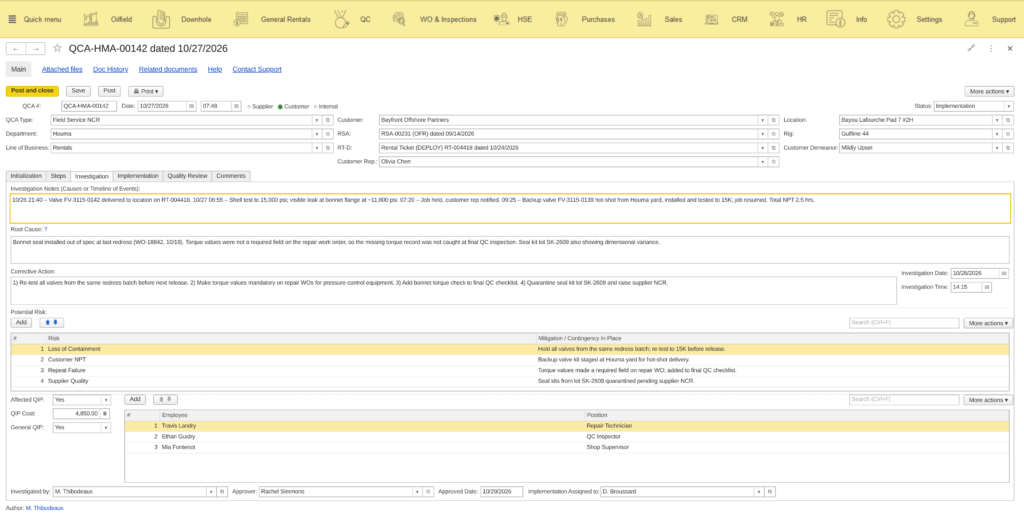
Quality management software for every kind of quality issue

Use it as nonconformance management software and for customer complaints. A QCA can record a quality issue from a supplier, a customer or your own operation. The QCA Type comes from your own catalog.
Non-conformance reports (NCR)
Field Service NCR and Internal NCR are common QCA types.
Corrective action requests (CAR)
Field Service CAR is a common QCA type.
Customer complaint management
Record the customer, their representative and their disposition.
Root cause analysis software
The investigator records the causes or timeline of events and the root cause.
Risk assessment
Each potential risk is recorded with its mitigation or contingency in place.
Quality improvement plans
Attach a Quality Improvement Plan and its cost to the case.
A QCA can be opened on its own or raised from related field ticket, rental ticket or inspection. From there it moves step by step through investigation, approval, corrective action and final review, and each step sends a notification.

Want to know more?

See RigER quality control software in action
Book a Call

Frequently asked questions

How much work is it to set up?

The Quality Control module is optional and is turned on per database by RigER Support. Your System Administrator appoints a QC Admin, and the QC Admin assigns the people responsible for Investigation, Approval, Implementation and Quality Review and fills the drop-down catalogs. The status matrix is optional.

Will my team actually follow the process?

Each role owns one step, and RigER e-mails the next responsible user as a case advances. The notification restates the case header, the problem, the equipment list and the investigation, so the recipient has full context. The Steps tab records the date and time each notification was sent.

Can a case be closed without a proper investigation?

The QC Approver must approve the investigation before implementation starts, and the QC Reviewer checks every step before setting the case to Done. Either can send the case back. An optional status matrix sets which status a user may switch to next, so steps cannot be skipped. A case is never edited freely from beginning to end: it advances step by step, and each step records who acted and when.

Who can see and edit our quality cases?

RigER controls access through licenses, access levels and role-based permissions, following the principle of least privilege. A user sees and can act on a QCA only as far as their assigned role and the case’s current status allow. The QCA Access Matrix tool shows which users can view and edit a QCA at each step.

Does it work with the rest of RigER?

Yes. A QCA can be raised from a related Field Ticket, Rental Ticket or inspection. The linked document appears under the Related documents tab and on the QCA header (RSA, RT-ID).

How does it stop the same problem from coming back?

Every case records the root cause and the corrective action, and the fix is broken into tasks, each with a deadline and a responsible performer. The case only closes after the QC Reviewer checks every step and adds the final notes. The QCA Dashboard can be filtered by Type, Department and Line of Business, so you can see where quality issues keep coming from.

Can management track open quality issues?

Yes. The QCA Dashboard is a filterable live list of all cases by Department, Line of Business, Type, Status, Days Aging, Responsible, Company, Rig, RSA, Affected and Close Date, with cause, risk and equipment detail. The QC section also provides five reports: Corrective Action QIP, QCA Employee, QCA Listing, QCA Manager and QCA Summary.